2. Version control
This chapter describes the concept of version control systems and how they help in the creation process.
2.1 Concept
There are several concepts of version control systems. They usually differ in that the versioned data is stored centrally or may be distributed. This storage of versioned data is called a repository. However the basic concept is that you do check out files from a repository to a local space on your computer, and push the changes back to the repository.
This repository can reside on your local machine or on a server that is accessible in the internet by authorized people (cloud).
The management software that controls that repository and supports you with additional functionaliy (diff view etc.) is called a software control management program (SCM).
2.2 Versions
If you change files you can commit this set of changed files as a change set into the repository. The SCM allows you to add a comment and tags to the commit. In addition, the SCM automatically adds some meta-data to a commit like the author of the change and the date of the commit. Furthermore depending on the SCM it is possible to link tasks or work items to a commit. Each commit can be assigned to so-called milestones that define a certain status in the project (Releases for example). Some SCM allow to take baselines of a certain status.
2.3 Diff view
While the SCM keeps track on the chronological order of changes it may of interest to visualize the changes from one version to the other. In case of text files this is very easy:
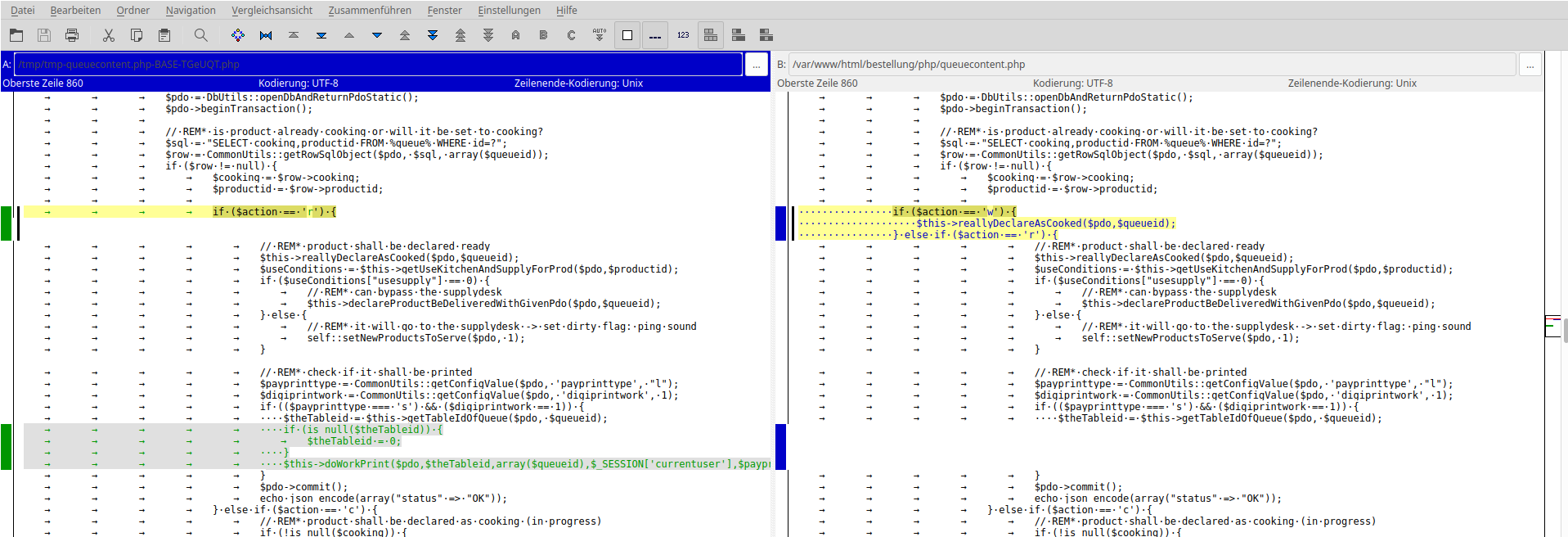
Also for other file types like images people have found many ways to make changes vivible. Unfortunately, in the 3D artist world most of the files have a binary content that are very difficult to compare with each other. But also for these cases there are useful workarounds that will be shown later.